
SendForth4.4 - Get APK
You'll be able to download in few seconds.
Publisher Description
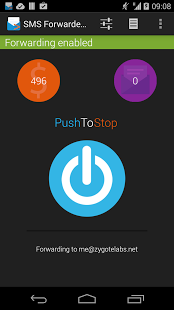
Forward your SMS anywhere with SendForth.
• Forward your SMS to another phone and/or email
• Forward notifications of missed calls
• Include details such as contact information and phone status
• Use keyword and number filtering to only forward specific messages
• Beautiful material design
SendForth allows you to easily and securely forward incoming and outgoing text messages to another email or phone. You can even get notification of missed calls. With a ton of features and functions, SendForth is the most feature rich SMS forwarder application for Android and the only one offering a premium, secure, reliable and instant forwarding service to email. The app itself is completely free, you only pay for the email credits you can buy and use inside the app.
SendForth is perfect for when you have to leave your phone behind, or if you simply want to back up your messages to your email on the fly. Maybe you have multiple phones and would like to consolidate your messages on one single device.
No need for complicated configurations, just set the email address or phone number you want your texts to be forwarded to and you're set. You specify can multiple addresses and numbers too!
== FAQ ==
• Outgoing messages are not being forwarded
> If outgoing messages are not being forwarded make sure of the following:
--- No task killers! Task killers have no effect with Android and should never be used. They do more harm than good.
About SendForth
The company that develops SendForth is Aegis Dynamics. The latest version released by its developer is 4.4.
To install SendForth on your Android device, just click the green Continue To App button above to start the installation process. The app is listed on our website since 2017-06-04 and was downloaded 0 times. We have already checked if the download link is safe, however for your own protection we recommend that you scan the downloaded app with your antivirus. Your antivirus may detect the SendForth as malware as malware if the download link to com.connectutb.smsforwarderpro is broken.
How to install SendForth on your Android device:
- Click on the Continue To App button on our website. This will redirect you to Google Play.
- Once the SendForth is shown in the Google Play listing of your Android device, you can start its download and installation. Tap on the Install button located below the search bar and to the right of the app icon.
- A pop-up window with the permissions required by SendForth will be shown. Click on Accept to continue the process.
- SendForth will be downloaded onto your device, displaying a progress. Once the download completes, the installation will start and you'll get a notification after the installation is finished.
Program Details
System requirements
Download information
Pricing
Version History
version 4.4
posted on 2017-06-04
Version 4.4 brings with it plenty of bug fixes and stability improvements.
version 4.2
posted on 2016-09-05
It's been a long time coming but the version 4.2 of SendForth is finally here. Changes are plenty and mostly under the hood ensuring the best possible experience, however some of the notable changes include:,- Runtime permissions.,- New Metadata option,- Significant number of bug fixes,- Numerous performance enhancements
version 3.6.8
posted on 2014-11-05
Several fixes and updates
Disclaimer
External Download
We do not host SendForth on our servers. We did not scan it for viruses, adware, spyware or other type of malware. This app is hosted by Galad and passed their terms and conditions to be listed there. We recommend caution when installing it.
The APK Download link for SendForth is provided to you by apps112.com without any warranties, representations or guarantees of any kind, so access it at your own risk.
If you have questions regarding this particular app contact the publisher directly. For questions about the functionalities of apps112.com contact us.
